EasyWorship 8 not displaying PowerPoint slides correctly
2 CommentsSorted by Oldest First

Terry Stout
said
6 days ago
Try changing the settings on the EW icon
Override the High DPI Scaling Behavior for EasyWorship
If your screen setup is correct and you're still having the issue, you will need to override the high DPI scaling behavior for EasyWorship. Follow the instructions below to disable the high DPI scaling behavior for EasyWorship:
- Close the EasyWorship program.
- Right click on the EasyWorship icon on the desktop and click on Properties.
- Click on the Compatibility Tab.
- Click on Change settings for all users.
- Click on Change high DPI settings.
- Check the box next to Override high DPI scaling behavior.
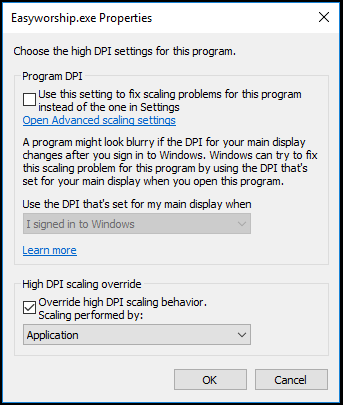
- Click OK.
- Click Apply then OK.
- Click OK.
- Open EasyWorship and see if your PowerPoints display correctly now.
Thank you Terry for your reply. However, I have done this and also on Powerpoint I found under 'Options' and 'When using multiple screens' I ticked the circle for 'Optimise for compatibility'. Nothing works except for EasyWorship 7 which always and still is fine with Powerpoint.
Offingtonparkchurch
When I try to display powerpoint slides using Easy Worship version 8 it enlarges them so that they do not fit within the screen. I have tried to do the DPI scaling but when opening the Powerpnt.exe there is no Compatibly tab to open, so I can’t.
However, PowerPoint slides work fine on Easy Worship version 7. So for now we are sticking with that, but we would like to use 8. Please what is wrong with version 8?